
Adding Custom Promos
Содержание: In Plesk, promos are banners shown on the Home screen. Promos from the Plesk team advertise the different features and extensions Plesk administrators can add or install. In addition, administrators can add custom promos.
In this topic, you will learn how to add custom promos.
Общие сведения об обновлениях
All promos, both custom and those from the Plesk team, are shown in a widget on the Home screen. The widget takes the form of a carousel, enabling the user to scroll through the available promos.
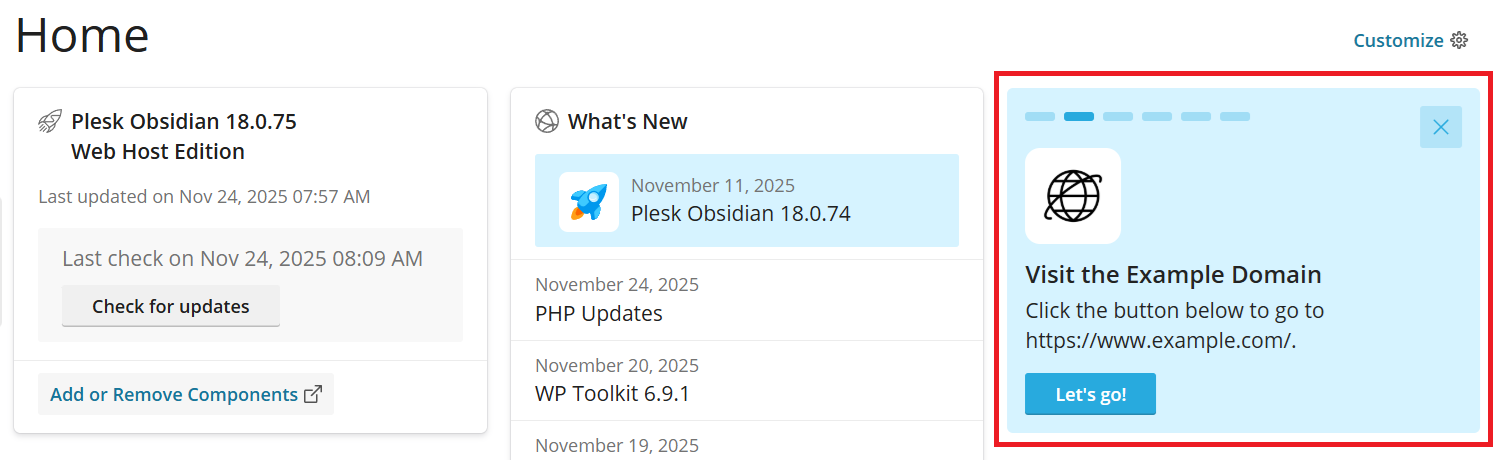
A promo can include some or all of the following:
- An icon.
- A header.
- Body text.
- An action button.
We strongly recomment that your custom promos should feature each of those components to make them useful and visually appealing.
Предварительные требования
- To be able to see the promos, both custom ones and those from the Plesk team, the «Promo» widget on the Home screen must be enabled.
Challenges and Limitations
- Since the promos are only shown on the Home screen, they cannot be seen by anyone not using the Service Provider view.
- No more than five promos can be shown in the carousel. Adding a custom promo will replace one from the Plesk team. If you add more than five custom promos, only the first five will be shown.
Adding a Custom Promo
Custom promos can be added by editing the panel.ini configuration file. To add one, declare it in the [promos] section of the file.
To declare a promo, add between one and five parameters with a matching promo name. You can use some or all of the following parameters:
-
custom.<promo name>.title- the title of the promo, shown in bold. If this parameter is omitted, the promo will have no title. -
custom.<promo name>.icon- the URL to an image to be used as the promo’s icon. If this parameter is omitted, or the URL is unreachable, a blank white square is shown instead of a logo. -
custom.<promo name>.text- the body text of the promo. If this parameter is omitted, the promo has no text. -
custom.<promo name>.buttonUrl- the URL of the page the user is taken to when they click the promo’s action button. If this parameter is omitted, clicking the button reloads the Plesk Home page. -
custom.<promo name>.buttonText- the text on the promo’s action button. If this parameter is omitted, a square blue button with no text is shown.
Here’s what a custom promo with all five parameters specified may look like.
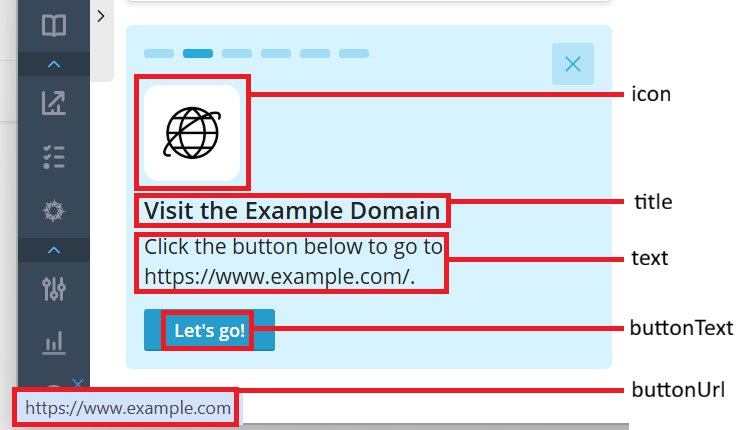
Here’s how to declare this promo:
[promos]
custom.promo.title = "Visit the Example Domain"
custom.promo.icon = https://198.51.100.1/icons/promo-icon.png
custom.promo.text = "Click the button below to go to https://www.example.com/."
custom.promo.buttonUrl = "https://www.example.com/"
custom.promo.buttonText = "Let's go!"