
Performing Initial Server Setup
Initial server setup is performed right after installing Plesk on a server. This operation includes:
Specifying Plesk Administrator’s personal information
Changing default Plesk Administrator’s password
Specifying full host name
To initially set up Plesk server, use the initial_setup operation.
Note
Using the initial_setup operation later on to change administrator’s password or personal info is prohibited. For this purposes, use the set operation instead.
Request Packet Structure
A request XML packet starting server initial setup contains the initial_setup operation node:
<packet>
    <server>
        <initial_setup>
            ...
        </initial_setup>
    </server>
</packet>
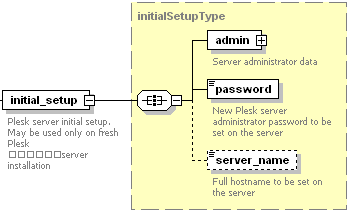
The initial_setup node is presented by complex type
initialSetupType (plesk_server.xsd) and structured as follows:
Note
The interactive schema navigator for all request packets is available here: http://plesk.github.io/api-schemas/1.6.9.1/agent_input.svg.

The admin node is required. It holds the collection of data describing Plesk Administrator’s personal info. Data type: adminType (
plesk_server.xsd). For information on this node structure, refer to the Administrator Personal Information section.The password node is required. It holds the new Plesk Administrator’s password that will replace the default one. Data type: serverPassword (
plesk_server.xsd). Allowed values: 5 to 14 characters.The server_name node is optional. It specifies the full host name. Data type: string.
The trial_license node is available starting with Plesk 17.8.10. Used to install a full-featured trial license right from the Plesk post-installation configuration dialog.
Note
By using the trial_license node, you authorize Plesk to collect, store, process, and use your personal data (name and email), including cross-border processing, in accordance with the applicable data protection laws currently in effect, for issuing your trial license as a part of a licensing contract between you and Plesk.
Note
When creating request packets, put nodes and elements in the order they follow in the packet structure.
Response Packet Structure
The initial_setup node of the response packet is structured as follows:
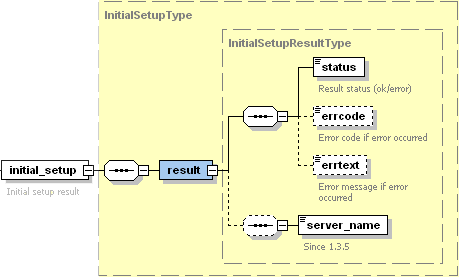
The result node is required. It wraps the result of the initial_setup operation. Data type: InitialSetupResultType (
server_output.xsd).The status node is required. It returns the execution status of the initial_setup operation. Data type: string (
common.xsd). Allowed values: ok | error.The errcode node is optional. It returns the error code when the initial_setup operation fails. Data type: unsignedInt (integer) .
The errtext node is optional. It returns the error message if the initial_setup operation fails. Data type: string.
The server_name node is required if the initial_setup operation succeeds. It returns the name of the server on which initial setup was successfully performed. Data type: string.
Note
The interactive schema navigator for all response packets is available here: http://plesk.github.io/api-schemas/1.6.9.1/agent_output.svg.

Samples
A request packet performing initial setup of Plesk server can look as follows:
<packet>
    <server>
        <initial_setup>
            <admin>
                <admin_cname>JohnDoe BV.</admin_cname>
                <admin_pname>John Doe</admin_pname>
                <admin_phone>+49 89333333</admin_phone>
                <admin_fax>+49 893333303</admin_fax>
                <admin_email>john@doe.de</admin_email>
                <admin_address>Theatinerstrasse 96</admin_address>
                <admin_city>Muenchen</admin_city>
                <admin_state>Bavaria</admin_state>
                <admin_pcode>80333</admin_pcode>
                <admin_country>DE</admin_country>
                <send_announce>true</send_announce>
            </admin>
            <password>setup</password>
            <server_name>com3.doe.de</server_name>
        </initial_setup>
    </server>
</packet>
Response:
<packet>
    <server>
        <initial_setup>
            <result>
                <status>ok</status>
                <server_name>com3.doe.de</server_name>
            </result>
        </initial_setup>
    </server>
</packet>
A negative response received from server may look as follows:
<packet>
    <server>
        <initial_setup>
            <result>
                <status>error</status>
                <errcode>1003</errcode>
                <errtext>Initial setup already completed</errtext>
                <server_name>com3.doe.de</server_name>
            </result>
        </initial_setup>
    </server>
</packet>
Such error is received if the request packet sent to the server tried to perform initial setup on a server where it has already been done.
A request packet performing initial setup of Plesk 17.8.10 with a full-featured trial license can look as follows:
<packet>
    <server>
        <initial_setup>
            <admin>
                <admin_pname>john_doe</admin_pname>
                <admin_email>johndoe@mail.com</admin_email>
            </admin>
            <password>setup</password>
            <trial_license>true</trial_license>
        </initial_setup>
    </server>
</packet>
Response:
<packet>
    <server>
        <initial_setup>
            <result>
                <status>ok</status>
            </result>
        </initial_setup>
    </server>
</packet>