
获取 Plesk 产品许可证密钥
有多种方式获取一个或多个 Plesk 产品许可证密钥。
下载免费的试用许可证密钥
Before purchasing a paid license, you can start with a free trial license. With this license, you can evaluate Plesk for 14 days and try it out with up to 3 domains.
To get you free trial license:
Go to our website.
Fill out the form.
You will receive a confirmation email. Confirm your email address.
You will receive a trial activation guide by email. Click Get Started inside the email.
-
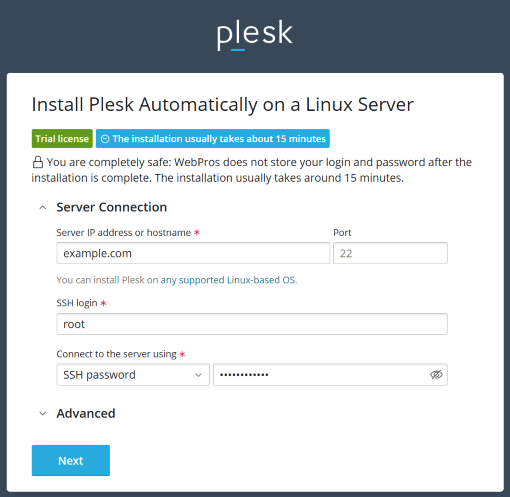
Use the Plesk Web Installer to install Plesk on your server. Specify the following settings:
Server IP address or hostname. Specify your server’s Internet address.
SSH login. Specify your server’s SSH login.
Connect to the server using. Select the authentication method you want to use to connect to the server: password or SSH key.

Click Next.
When the setup finishes, you will receive an email with your installation details.
从在线商店购买许可证密钥
试用 Plesk 后觉得满意则可以直接从我们的网站购买一种产品许可证。进入 https://www.plesk.com/plans-pricing/ ,选择最适合您业务需要的许可证类型,最后购买。
通过 Partner API 发行
当您需要快速部署多台 Plesk 服务器时,您可以通过 Partner API 自动化管理产品许可证。参阅 Key Administrator Partner API 3.0: Developer’s Guide 了解详情。
通过 Partner API 管理产品许可证密钥能够:发行新许可证,终止不再使用的许可证,等等。
配置许可证密钥用于克隆 Plesk 服务器
按需获取多个产品许可证的另一种方式就是请求为通过克隆部署的新实例自动发行新的许可证密钥。若要使用该方式,在您开始克隆 Plesk 实例之前,请联系我们的销售代表且提供您将要安装的 Plesk 实例的 IP 地址的范围。
备注
与 Partner API 不同,通过该方式获取许可证,您需要负责监控和终止不再使用的许可证密钥。