
Managing Site Aliases
Operator: <site-alias>
XML Schema: domainalias_input.xsd, domainalias_output.xsd
Plesk version: Plesk 10.0 and later
API RPC version: 1.6.3.0 and higher
Plesk user: Administrator
Description
Site aliases are alternative names for the site name. You can also use site aliases to redirect mail and Java applications from the site alias to your original site name. Tomcat (Java) redirection means that the Tomcat server set on the primary site (port 9080) handles requests coming from site aliases (from port 9080). Plesk Administrators can manage all site aliases registered on Plesk server.
Supported operations
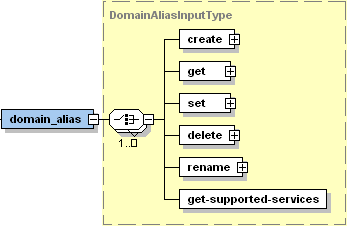
CREATE creates an alias for the specified site
GET retrieves the alias settings for the alias specified by ID name, or the primary site ID, name
SET updates the alias settings for the alias specified by ID name, or the primary site ID, name
DELETE removes the specified alias from the site
RENAME renames the alias related to the specified site
GET-SUPPORTED-SERVICES retrieves the list of site alias supported services which can be managed on the server
Remarks
When you set up a site alias, resource records in its DNS zone are copied from the original site name. This means that if your original site points to an external mail server, your site alias will point to that mail server, too. However, to accept mail for the site alias, the external mail server should be configured accordingly.
Whenever you change mail exchange records in the site DNS zone, be sure to introduce the respective changes in the DNS zone of the site alias.
If you need to serve several site names that point to a web site hosted on another server, you should set up site forwarding.