
Add Custom Buttons
To add custom buttons, you need to create a class inherited from
pm_Hook_CustomButtons.
The class must be placed in the directory plib/hooks/. The place
parameter specifies the custom button’s location in the interface. You
can find the complete list of supported values for the place
parameter in the
Constants
section of the reference.
The following sample project is provided by Plesk to illustrate adding an extension’s custom buttons in different locations in the interface: https://github.com/plesk/ext-custom-buttons.
User Home Page
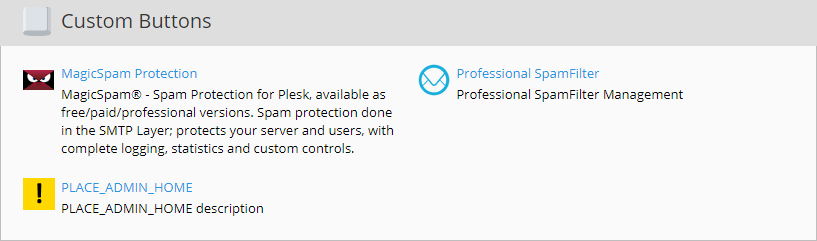
The PLACE_ADMIN_HOME and PLACE_RESELLER_HOME custom buttons are
placed on the Administrator’s and the Reseller’s home pages, in the
section Custom Buttons.
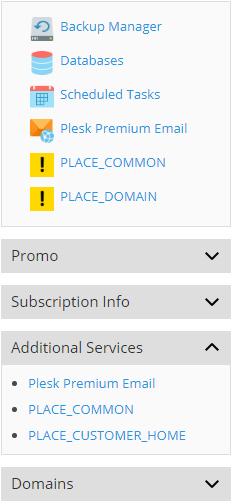
PLACE_CUSTOMER_HOME is placed on Websites & Domains pages, in
the right sidebar, and is visible to all users.
Navigation Menu
PLACE_ADMIN_NAVIGATION and PLACE_RESELLER_NAVIGATION place
custom buttons in the Navigation Menu for the Administrator and the
Reseller correspondingly.
PLACE_HEADER_NAVIGATION custom button appears in the header,
following the user name.
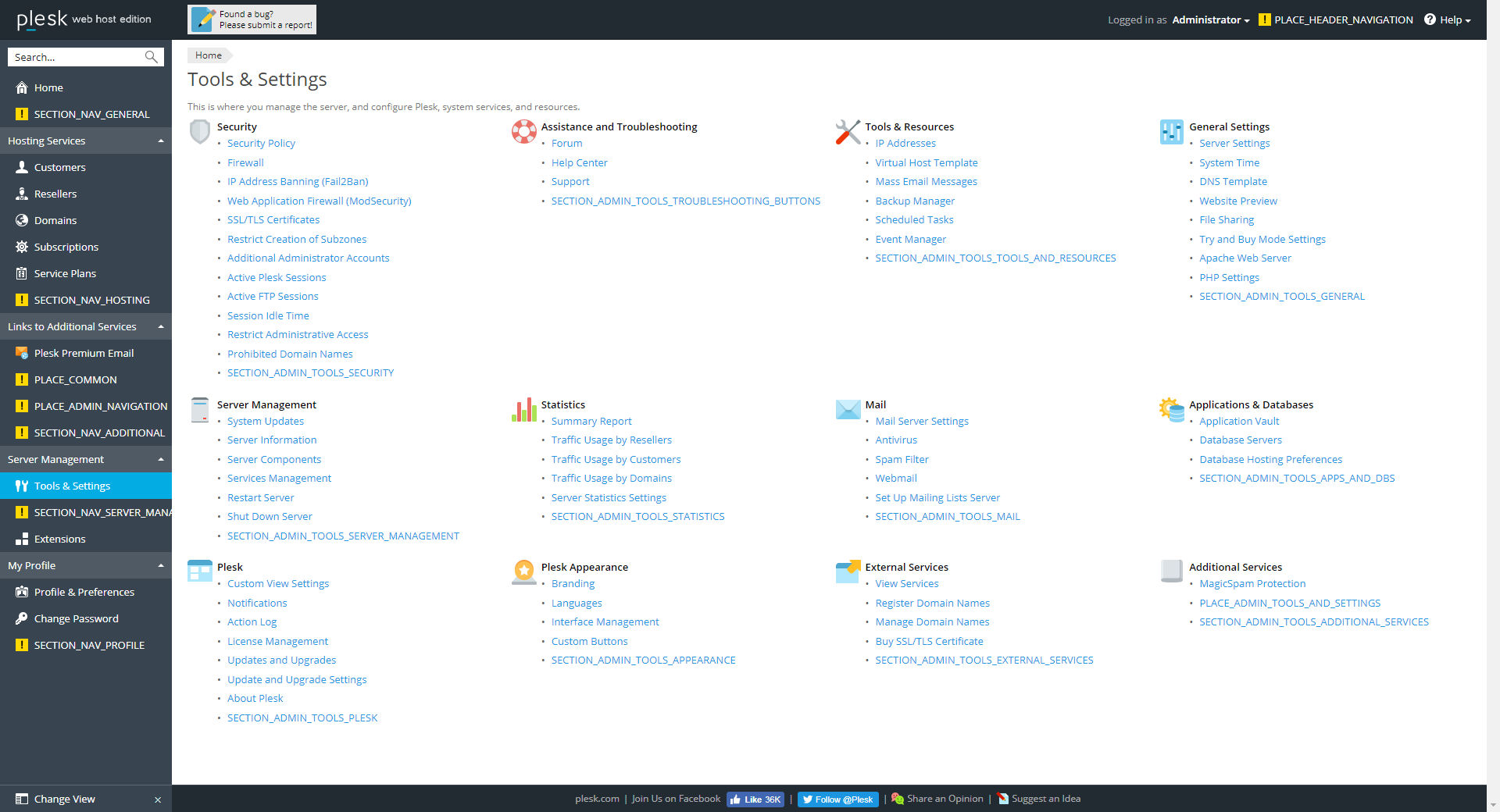
By default, the buttons are placed in the Links to Additional
Services section of the menu. The section parameter with the
following values allows to place custom buttons in different sections of
the menu:
-
SECTION_NAV_GENERAL- the top section -
SECTION_NAV_HOSTING- Hosting Services section -
SECTION_NAV_PROFILE- My Profile section -
SECTION_NAV_ADDITIONAL- Links to Additional Services section -
SECTION_NAV_SERVER_MANAGEMENT- Server Management section
The order parameter can be used to specify the position of the
custom button in the list within a section (“1” for the first position
in the list and so on). If left unspecified, the custom button will be
added to the end of the section.
Note: The order parameter should be used extremely carefully, and only
to help group related items.
Tools & Settings Page
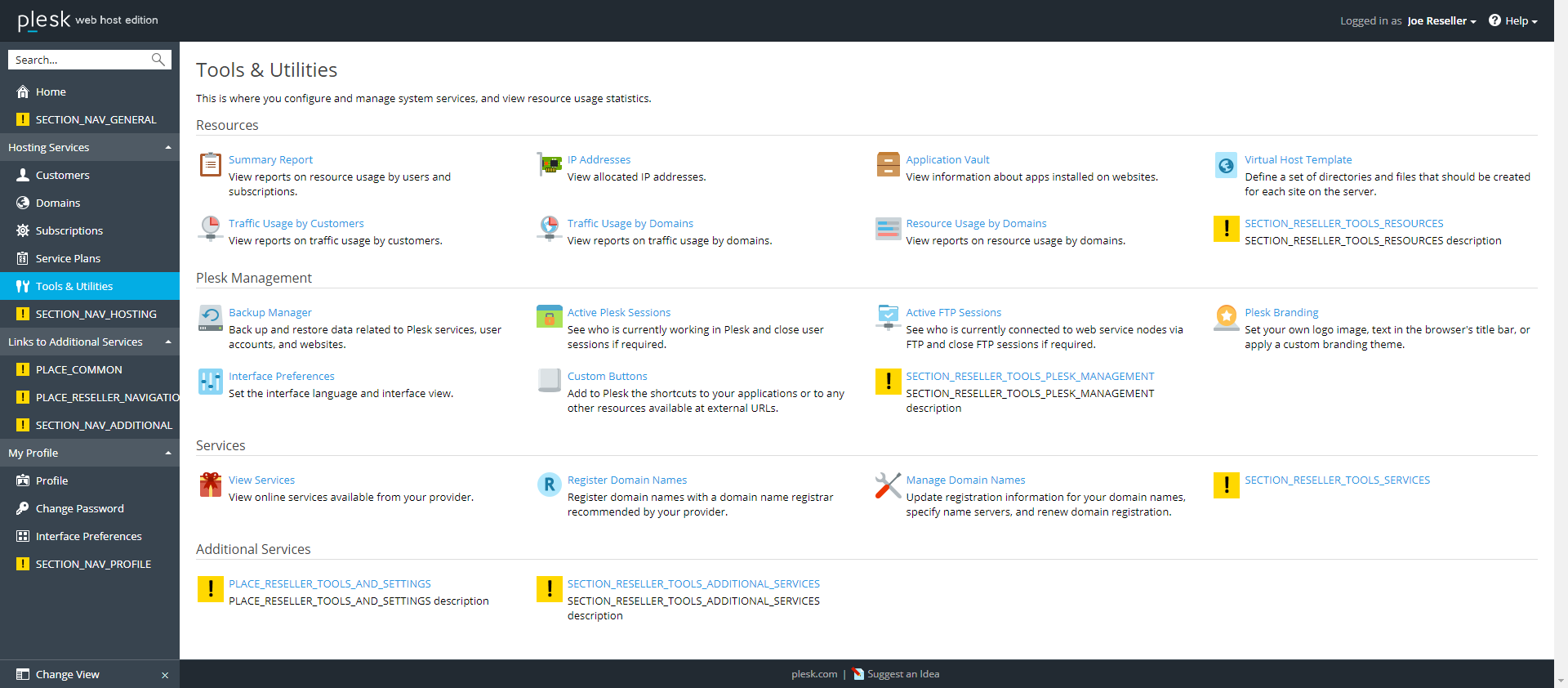
PLACE_ADMIN_TOOLS_AND_SETTINGS and
PLACE_RESELLER_TOOLS_AND_SETTINGS are used to add custom buttons to
the Tools & Settings page for the Administrator and to the Tools &
Utilities page for the Reseller.
By default, the buttons are placed in the Additional Services
section of either page. The section parameter allows to specify the
section. For the Administrator:
-
SECTION_ADMIN_TOOLS_MAIL- Mail section -
SECTION_ADMIN_TOOLS_PLESK- Plesk section -
SECTION_ADMIN_TOOLS_GENERAL- General Settings section -
SECTION_ADMIN_TOOLS_SECURITY- Security section -
SECTION_ADMIN_TOOLS_APPEARANCE- Plesk Appearance section -
SECTION_ADMIN_TOOLS_STATISTICS- Statistics section -
SECTION_ADMIN_TOOLS_APPS_AND_DBS- Applications & Databases section -
SECTION_ADMIN_TOOLS_EXTERNAL_SERVICES- External Services section -
SECTION_ADMIN_TOOLS_SERVER_MANAGEMENT- Server Management section -
SECTION_ADMIN_TOOLS_ADDITIONAL_SERVICES- Additional Services section -
SECTION_ADMIN_TOOLS_TOOLS_AND_RESOURCES- Tools & Resources section -
SECTION_ADMIN_TOOLS_TROUBLESHOOTING_BUTTONS- Assistance and Troubleshooting section
For the Reseller:
-
SECTION_RESELLER_TOOLS_SERVICES- Services section -
SECTION_RESELLER_TOOLS_RESOURCES- Resources section -
SECTION_RESELLER_TOOLS_PLESK_MANAGEMENT- Plesk Management section -
SECTION_RESELLER_TOOLS_ADDITIONAL_SERVICES- Additional Services section
The order parameter can be used to specify the position of the
custom button in the list within a section (“1” for the first position
in the list and so on). If left unspecified, the custom button will be
added to the end of the section.
Note: The order parameter should be used extremely carefully, and only
to help group related items.
Other Locations
-
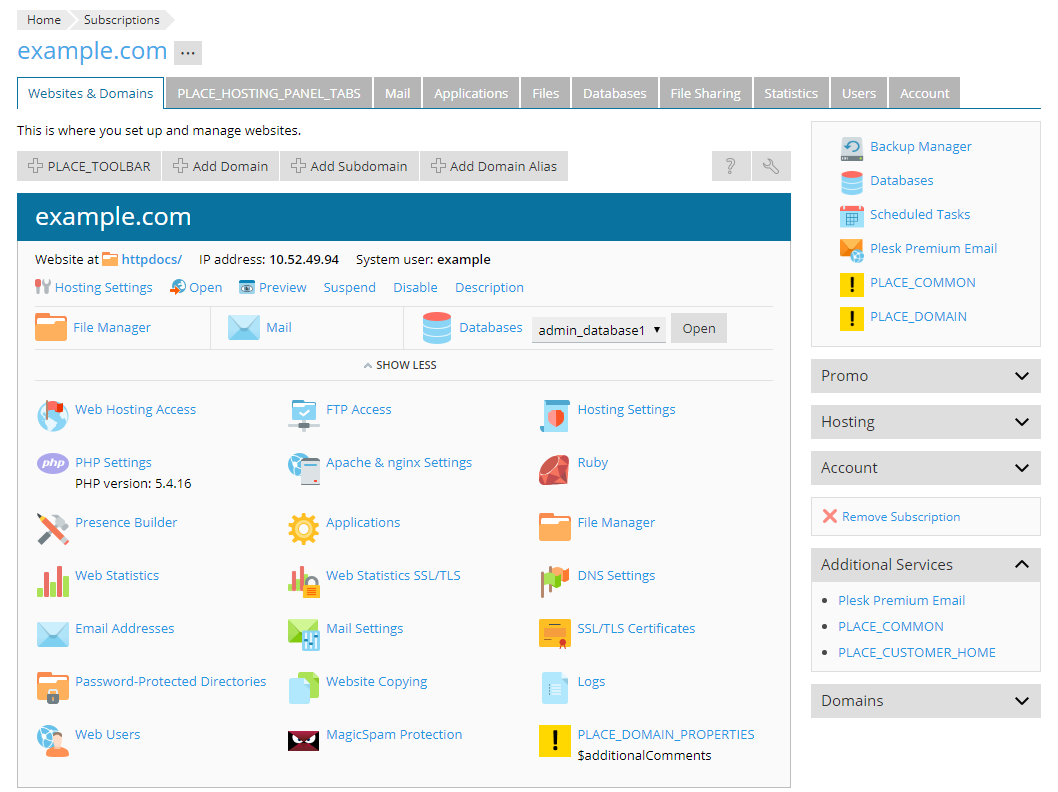
PLACE_COMMON- appears in several locations simultaneously: the Links to Additional Services section in the Navigation Menu, the top section and the Additional Services section in the right sidebar. -
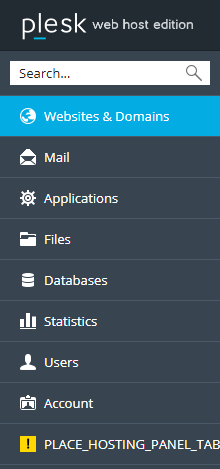
PLACE_HOSTING_PANEL_TABS- appears as an additional tab on the subscription page, also appears as one of the items in the Navigation Menu in the Customer interface.
-
PLACE_TOOLBAR- adds a new button above all lists. -
PLACE_DOMAIN_PROPERTIES- appears as an additional button on the Webspaces & Domains tab (in Active View mode). ParameteradditionalCommentsprovides additional information clarifying the purpose of the button. Can be either single-line (string) or multi-line (array). -
PLACE_LIST_ACTIONS- appears as an additional button on other lists with Active View mode available. -
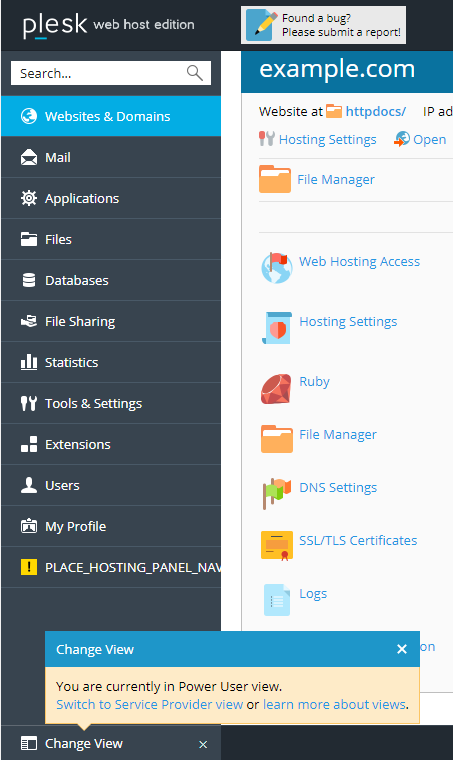
PLACE_HOSTING_PANEL_NAVIGATION- appears as an additional item in the Navigation Menu in the Administrator’s interface in Power User mode.
Parameters
| Parameter | Value | Description |
|---|---|---|
place |
constant, array of constants |
Specifies the button’s location in the interface, e.g.
PLACE_COMMON
|
section |
constant | Where applicable, specifies the part ot the interface location
defined by place, e.g. SECTION_NAV_GENERAL
|
order |
integer > 0 | The button’s position in the list of elements |
title |
text | The text on the button |
description |
text | The button’s tooltip text or a description text accompanying its title |
icon |
URL |
Location of the button’s icon graphics file (PNG, 32 x 32 px, 64 x 64 px, 128 x 128 px) Icons for Dynamic List must instead meet the following requirements:
|
link |
URL | Redirect location of the button |
newWindow |
boolean | Create a new window at redirect or not |
contextParams |
boolean, used in |
Specify whether or not to send the context-dependent parameters:
|
visibility |
callback returning a boolean |
A callback method. Defines whether or not the button should be displayed. |
additionalComments |
text or callback, used in |
Additional information. |
Example
The following examples shows how to add several custom buttons. The used method:
Use the following code:
class Modules_CustomButtons_CustomButtons extends pm_Hook_CustomButtons
{

    public function getButtons()
    {
        return [[
            'place' => self::PLACE_DOMAIN,
            'title' => 'Domain Button',
            'description' => 'Description for domain button',
            'icon' => pm_Context::getBaseUrl() . 'images/icon.png',
            'link' => pm_Context::getBaseUrl() . 'index.php/index/index',
        ], [
            'place' => [
                self::PLACE_HOSTING_PANEL_NAVIGATION,
                self::PLACE_ADMIN_TOOLS_AND_SETTINGS,
                self::PLACE_RESELLER_TOOLS_AND_SETTINGS,
            ],
            'title' => 'Multi Place Button',
            'description' => 'Description for multi place button',
            'link' => 'https://plesk.com/',
            'newWindow' => true,
        ]];
    }

}
class Modules_CustomButtons_CustomButtons extends pm_Hook_CustomButtons
{
    public function getButtons()
    {
        return [[
            'place' => self::PLACE_ADMIN_TOOLS_AND_SETTINGS,
            'section' => 'toolsAndResourcesButtons',
            'order' => 1,
            'title' => 'My Button 1',
            'description' => 'Description for my button 1',
            'link' => pm_Context::getActionUrl('index', 'another'),
        ], [
            'place' => self::PLACE_ADMIN_TOOLS_AND_SETTINGS,
            'section' => 'generalButtons',
            'order' => 4,
            'title' => 'My Button 2',
            'description' => 'Description for my button 2',
            'link' => pm_Context::getActionUrl('index', 'another'),
        ]];
    }
}
Remarks
The important aspects of implementing custom buttons that should be paid attention to are their appropriate placement and decoration.
Admin-only functionality buttons must not appear on other users’ interface pages
Make sure that the custom buttons used for accessing functions pertaining only to the Administrator do not appear on Plesk screens accessible to other types of users, such as resellers and customers. The following locations must not contain admin-only functionality:
-
Navigation Menu on the left
Note: If the extension is not intended for frequent use by the Administrator, do not place its custom button to the Navigation Menu, so as not to overpopulate the menu.
-
Reseller and Customer Home pages
-
Domain overview
-
Tools & Utilities page (Reseller UI)
-
Right sidebar on Domain pages
Functions available to Customers and Resellers must appear in all appropriate places
Certain functions may be appropriate for enabling access to them from different places in the UI. Check to see that the corresponding custom buttons are available in all different places for all the different types of users.
Use the visibility property to hide functions unavailable for domains without hosting and aliases
Domains without hosting and domain aliases may or may not contain custom
buttons in the Domain Overview section
(PLACE_DOMAIN_PROPERTIES). To manage this, use the visibility
property to hide and show the custom buttons when appropriate.
Take advantage of the description property
Supplying the extension’s custom buttons with descriptions will help users to get accustomed to working with the extension more quickly and easily. Do not neglect this helpful instrument.
Make sure the different UI color schemes are supported
Plesk UI supports a variety of different color schemes, including light and dark schemes, which poses certain additional considerations for designing the extension UI. To check that your extension supports them, install the free Skins and Color Schemes extension.
Availability in Power User View
Make sure the necessary custom buttons are accessible, when Power User
View interface mode is active. For example, a button placed in
PLACE_HOSTING_PANEL_NAVIGATION appears only in Power User
View
mode in the Navigation Menu.