
Plesk 製品ライセンスキーを取得する
1 つまたは複数の Plesk 製品ライセンスキーを取得するには、目的に応じていくつかの方法があります。
無料の評価版ライセンスキーをダウンロードする
有料ライセンスを購入する前に、無料の評価版ライセンスで利用を開始することができます。このライセンスでは、Plesk を 14 日間評価でき、最大 3 つのドメインでの試用が可能です。
無料の評価版ライセンスを取得するには:
ウェブサイト にアクセスします。
フォームに記入します。
確認メールが届きます。メールアドレスを確認してください。
トライアルのアクティベーションガイドがメールで届きます。メール内の [Get Started] (開始する) をクリックしてください。
-
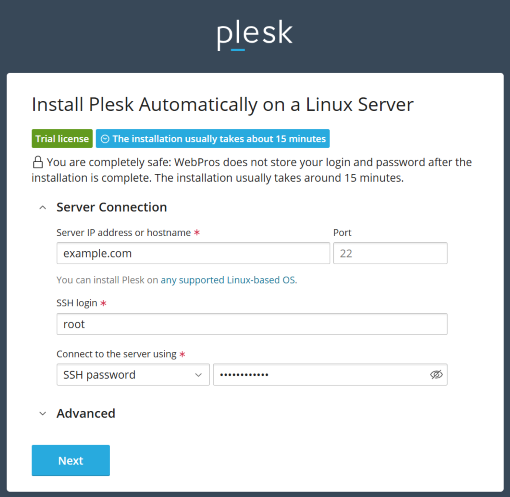
Plesk ウェブインストーラを使用して、サーバに Plesk をインストールします。以下の設定を指定してください。
サーバの IP アドレスまたはホスト名: サーバのインターネットアドレスを指定します。
SSH ログイン: サーバの SSH ログインを指定します。
サーバの接続に使用: サーバへの接続に使用したい認証方法を選択します (パスワードまたは SSH キー)。

[次へ] をクリックします。
セットアップが完了すると、インストールの詳細が記載されたメールが届きます。
ライセンスキーをオンラインストアで購入する
Plesk が要件を満たしていることを確認したら、さまざまな種類の製品ライセンスの中からライセンスを選び、ウェブサイトから直接購入できます。 https://www.plesk.com/plans-pricing/ にアクセスして、ビジネスのプロファイルに最適なライセンスタイプを選び、購入を続けます。
パートナー API 経由で発行する
複数の Plesk サーバを素早くデプロイする必要がある場合には、パートナー API 経由で製品ライセンス管理を自動化すると便利です。手順については、『Key Administrator Partner API 3.0: Developer's Guide』(Key Administrator パートナー API 3.0:開発者ガイド)を参照してください。
パートナー API 経由で製品ライセンスキーを管理する場合、新しいライセンスの発行、使用しなくなったライセンスの終了などにより、ライセンスを完全にコントロールすることができます。
Plesk サーバの複製用にライセンスキーをプロビジョンする
複数の製品ライセンスをオンデマンドで取得するその他のオプションとしては、複製によってデプロイされた新しいインスタンスに新しいライセンスキーが自動発行されるように依頼する方法です。このオプションを利用するためには、Plesk インスタンスの複製を開始する前に Plesk の営業担当までご連絡いただき、新しい Plesk インスタンスをインストールする IP アドレス範囲をお知らせください。
注釈
パートナー API と違い、この方法では、お客様の責任において使用しなくなったライセンスキーを監視し、解約していただく必要があります。