
Managing Mail
Operator: <mail>.
XML Schema: mail_input.xsd, mail_output.xsd,
plesk_mailname.xsd
Plesk version: Plesk 12.0 and later
XML API version: 1.6.6.0 and later
Plesk user: Administrator, customer
Description
The mail operator allows performing operations on mail service and mail accounts on a particular site.
The mail service settings specify whether the Webmail application is turned on for a particular site. These settings also specify the mail service behaviour when an incoming message is addressed to a non-existent user.
Mail user is the less privileged Plesk user. Creating Plesk mail user is equivalent to creating a special mail account on the specified site. This operation is allowed to Administrator and customers.
Mail account presents a collection of settings and lists of various objects. A mail account is created on a certain site and remains associated with this site during its lifetime. All objects created within the mail account (autoresponders, redirects, files, etc.) share the disk space of the site that owns this mail account.
Mail accounts are uniquely identified by name/ID of the parent site and by mail user name.
Mail user settings specify the following:
- Mail name and password, mail aliases
- Mail user access to his mail account through Plesk GUI
- Mail box settings
- Mail user permissions
- Antivirus protection
- Mail group members (if a mail account is used as a mail group)
- Groups in which a mail account has membership
- Files to store in the repository
- Automatic response messages
- Mail addresses to which all incoming correspondence will be redirected automatically
For more details, refer to the Mail Service Settings and Mail User Account Settings sections.
Supported operations
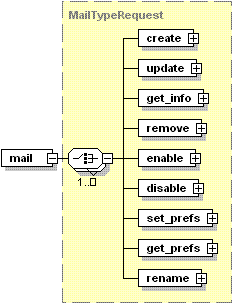
- CREATE creates a mail account on a specified site and sets a collection of settings for it
- UPDATE serves to update mail account settings. It is specially designed to operate lists of mail group members, repository files, and automatic reply messages set for the mail account
- GET_INFO serves to retrieve various information about the specified mail accounts from Plesk database
- REMOVE removes the specified mail account and all its settings from Plesk database
- ENABLE turns on the mail service on the specified site
- DISABLE turns off the mail service on the specified site
- SET_PREFS sets mail service preferences for the specified sites
- GET_PREFS gets mail service preferences set for the specified sites
- RENAME renames the specified mail box