
Open Access to Plesk Services on an Amazon Lightsail Instance
By default, on Plesk instances deployed from Amazon Lightsail images, certain Plesk services (for example, FTP, mail, and databases) cannot be accessed. This is because the ports required for them to operate are blocked by the Amazon Lightsail Firewall. To use these services, you need to manually allow connections to specific ports or port ranges.
By default, on Plesk instances on Amazon Lightsail all outgoing connections are allowed, and all incoming connections are blocked. Exceptions are made for connections to ports listed in the table below.
Service name |
Ports used by the service |
|---|---|
SSH (secure shell) server |
TCP 22 |
Web server |
TCP 80, TCP 443, TCP 8443, and TCP 8447 |
DNS |
TCP 53 and UDP 53 |
Access to Plesk services using ports not listed in the table above is blocked. To allow access to one or more blocked Plesk services, you need to open the corresponding ports in the Amazon Lightsail Firewall.
To allow access to a Plesk service on an Amazon Lightsail instance:
Under “INSTANCES”, click the name of the desired instance, and then go to the “Networking” tab.
-
Under “Firewall”, click +Add another and specify the following settings:
“Application”. Keep the default “Custom” value.
“Protocol”. Select the required protocol (TCP or UDP) from the drop-down list.
-
“Port range”. Specify the port or port range corresponding to the Plesk service you want to allow access to.

Click Save.
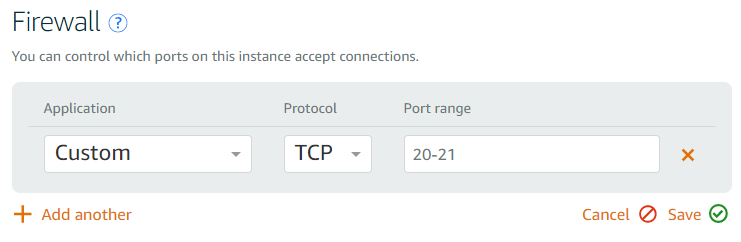
The following table shows the list of ports different Plesk services require to operate. For security reasons, we recommend that you allow access only to services you want to use. Keep the ports corresponding to the services you do not want to use closed. For example, if you want to use mail, open all ports listed in the “Mail” section.
Service group |
Service name |
Ports used by service |
Comments |
|---|---|---|---|
FTP |
Active FTP |
TCP 20-21 |
|
Implicit FTPS |
TCP 990 |
||
Passive FTP |
TCP 49152-65535 |
||
SMTP server |
TCP 25, TCP 465 |
Mail sending |
|
POP3 server |
TCP 110, TCP 995 |
Mail retrieval |
|
IMAP server |
TCP 143, TCP 993 |
Mail retrieval |
|
Email messages submission |
TCP 587 |
||
Database |
MySQL/MariaDB server |
TCP 3306 |
|
PostgreSQL server |
TCP 5432 |
||
Miscellaneous |
Administrative interface of Plesk over HTTP |
TCP 8880 |
For the list of ports you need to open to allow migrating customers and domains to or from your instance, read Migration Prerequisites.