Configuring a Smarthost or Relayhost for a Domain
Nota: Los términos smarthost y relayhost suelen usarse indistintamente. De aquí en adelante, nos limitaremos a utilizar el término smarthost.
resumen: You can configure a smarthost at the domain level in Plesk Obsidian 18.0.76 or later.
En este tema descubrirá:
Cuándo es beneficioso utilizar un smarthost.
Cómo configurar un smarthost en Plesk.
You can send emails from Plesk using its local SMTP server. However, some hosting providers block outgoing mail from local SMTP servers. Even when they allow it, email deliverability may be poor and messages can end up in spam. To avoid these issues, configure a smarthost.
A smarthost is a mail server that accepts messages from any sender and forwards them to their final destination. A smarthost acts as an intermediary to improve email deliverability and reduce the chances of messages being marked as spam.
When you send an email through a smarthost, the message appears to originate from the smarthost’s IP address. If the smarthost has a strong sending reputation, your email is more likely to reach the recipient’s inbox instead of being marked as spam. For this reason, we recommend using a reputable SMTP relay service as your smarthost (for example, SendGrid, Mailgun, Mailjet, or similar providers).
Configuring Smarthost for a Domain
You can configure a smarthost for an individual domain. This works in Plesk for Linux with Postfix and Plesk for Windows with either MailEnable or SmarterMail.
To configure a smarthost for a domain:
Choose a reputable SMTP relay service (for example, SendGrid, Mailgun, Mailjet, or similar providers) and create an account there.
Go to Websites & Domains > select a domain > Mail > Smarthost.
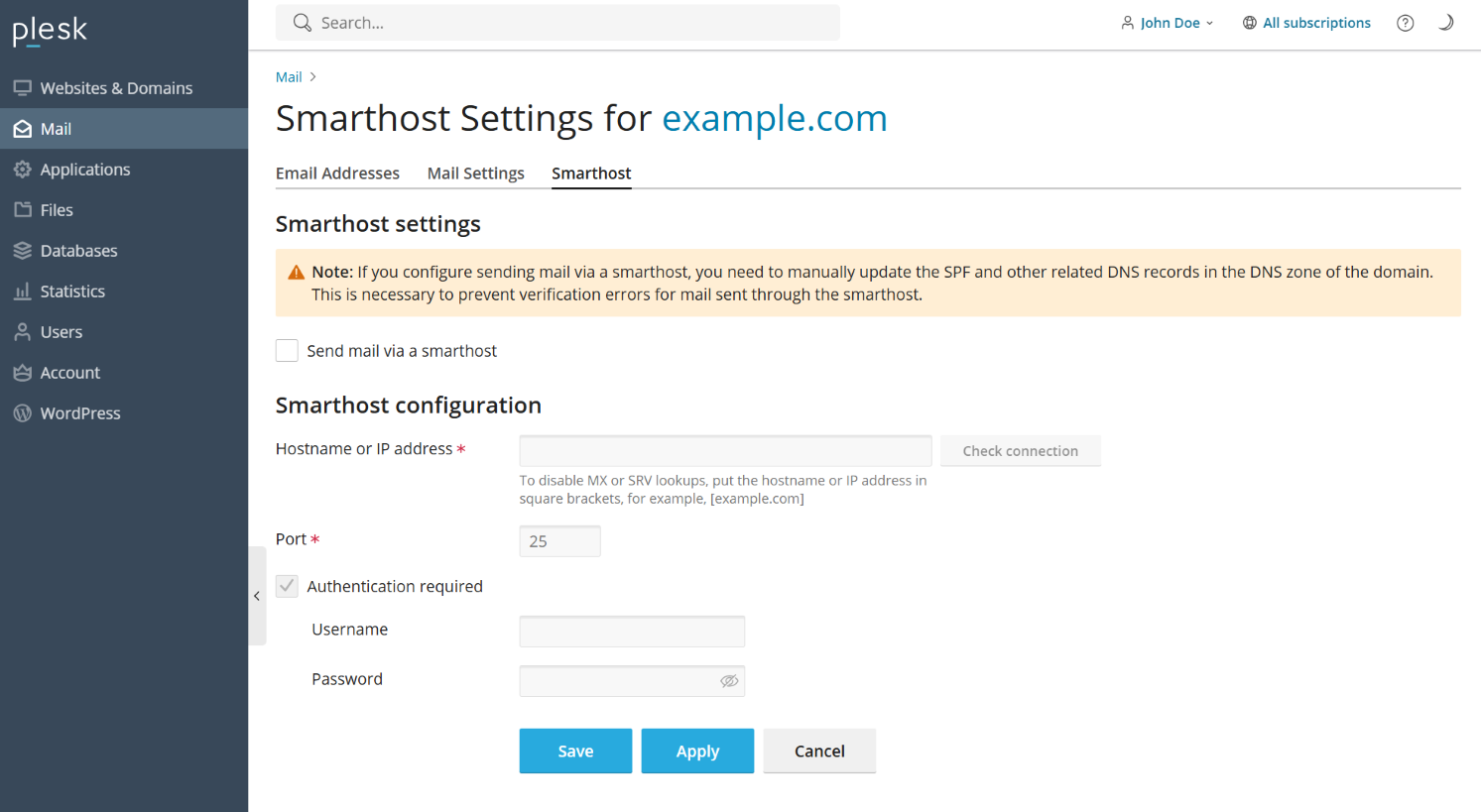
Seleccione la casilla «Enviar el correo de los usuarios a través de un smarthost».
-
En el campo correspondiente, especifique la dirección IP o el nombre de host de un smarthost (por ejemplo,
192.0.2.1osmtp.sendgrid.net).Nota: En Plesk para Linux, puede desactivar las búsquedas MX o SRV poniendo el nombre de host o la dirección IP entre corchetes, por ejemplo,
[example.com]. Si desea más información, consulte la documentación de Postfix (la sección sobrerelayhost). Si su servicio de retransmisión SMTP requiere autenticación SMTP (y la mayoría de los servicios la requieren), seleccione la casilla «Se requiere autenticación».
-
Si ha seleccionado «Se requiere autenticación» en el paso anterior, especifique las credenciales para autenticarse en su servicio de retransmisión SMTP.
Si el servicio soporta la autenticación básica, especifique el nombre de usuario y la contraseña en los campos correspondientes. Si el servicio soporta la autenticación mediante claves de API, en el campo «Nombre de usuario», especifique el nombre de usuario predeterminado utilizado para las claves de API en el servicio (por ejemplo, en SendGrid, el nombre de usuario es
apikey) y, en el campo «Contraseña», especifique el valor de la clave de API. (Opcional) Es posible que desee comprobar si se puede establecer la conexión con el smarthost. Para ello, haga clic en Comprobar conexión.
Haga clic en ACEPTAR.
-
Update the SPF record in the DNS zone of the domain you configured. This ensures the SMTP relay service is authorized to send mail for this domain.
Ha configurado el smarthost a nivel de Plesk. Sin embargo, la mayoría de los servicios de retransmisión SMTP comerciales requieren autenticación de dominio a su nivel (también se puede llamar verificación de dominio). Los siguientes servicios de retransmisión SMTP la requieren: SendGrid, Mailjet, Mailgun.
Go to your SMTP relay service account and authenticate the domain you just configured smarhost for in Plesk. For exact steps on how to do so, refer to the documentation of your service.
Envíe un email de prueba a un servicio de email externo (por ejemplo, Gmail) y asegúrese de que el email haya llegado a la bandeja de entrada.
Ha configurado el smarthost tanto en Plesk como en su servicio de retransmisión SMTP. Su smarthost ya está operativo.
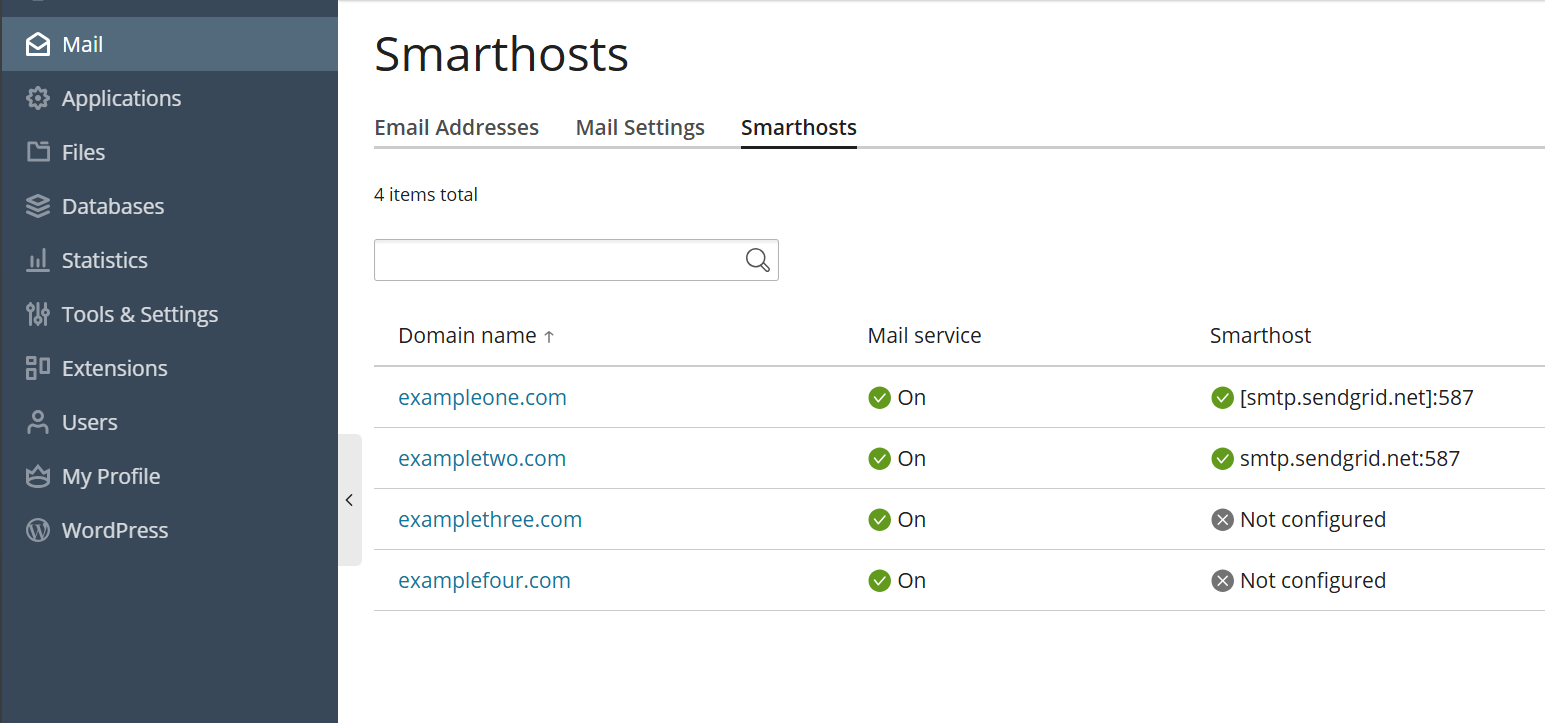
If you want to check which domains have an active smarthost, go to Mail > Smarthosts.