
Managing Reseller Accounts
Operator: <reseller>.
XML Schema: reseller.xsd
Plesk version: Plesk 10.0 and later
XML API version: 1.6.3.0 and later
Plesk user: Plesk Administrator, Plesk reseller
Description
Resellers are the Plesk users who own and manage customer accounts. All reseller accounts are managed by the Administrator. Once created, a reseller account is allotted a portion of Plesk server resources. A reseller account can be created with a unique collection of settings, or this can be done using a reseller plan that holds a collection of predefined settings. To learn more about reseller plans, refer to the Managing Reseller Plans section.
Summing up, a reseller account presents a set of reseller personal data and a collection of various settings. These settings are as follows:
Limits on Plesk resources usage, and limits usage policy
Permissions
Application pool settings
Supported Operations
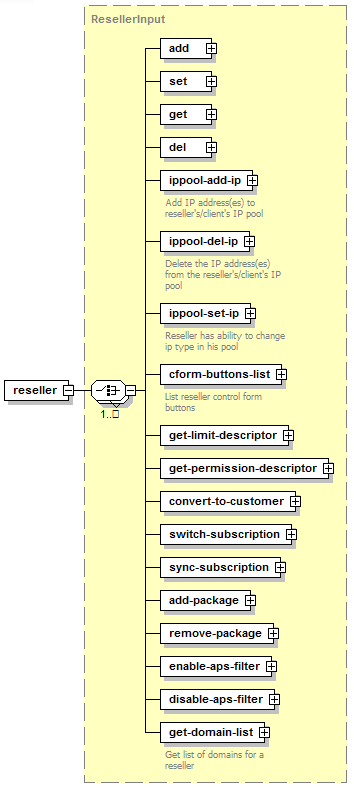
ADD creates a reseller account.
SET updates reseller account settings.
GET retrieves information on reseller accounts.
DEL removes reseller accounts.
IPPOOL-ADD-IP adds IP addresses to a reseller’s IP pool.
IPPOOL-DEL-IP removes IP addresses from a reseller’s IP pool.
IPPOOL-SET-IP changes type of IP addresses (shared/exclusive) in a reseller’s IP pool.
CFORM-BUTTONS-LIST displays a buttons list for a reseller’s home page.
GET-LIMIT-DESCRIPTOR retrieves reseller limit descriptor.
GET-PERMISSION-DESCRIPTOR retrieves reseller permission descriptor.
CONVERT-TO-CUSTOMER converts a reseller account into a customer account.
SWITCH-SUBSCRIPTION operation changes a reseller plan for a reseller account.
SYNC-SUBSCRIPTION operation rolls reseller account settings back to the values defined in an associated reseller plan.
GET-DOMAIN-LIST retrieves information about all the reseller’s domains.